
Folders Done Right
Why is organizing AI chats so hard? We fixed it. We built a file system for your thoughts.
Gemini™

AI Studio
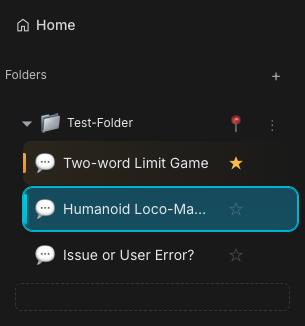
The Physics of Organization
It just feels right.
- Drag and Drop: Pick up a chat. Drop it in a folder. It’s tactile.
- Nested Hierarchy: Projects have sub-projects. Create folders inside folders. Structure it your way.
- Folder Spacing: Adjust vertical density from compact to spacious.
Note: On Mac Safari, adjustments may not be real-time; refresh the page to see the effect.
- Instant Sync: Organize on your desktop. See it on your laptop.
Pro Tips
- Multi-Select: Long-press a conversation to enter multi-select mode, then select multiple chats and move them all at once.
- Renaming: Double-click any folder to rename it.
- Icons: We automatically detect the Gem type (Coding, Creative, etc.) and assign the right icon. You don't have to do a thing.
Platform Feature Differences
Common Features
- Basic Management: Drag and drop, rename, multi-select.
- Smart Recognition: Automatically detect chat types and assign icons.
- Nested Hierarchy: Support for folder nesting.
- AI Studio Adaptive: Advanced features coming soon to AI Studio.
- Google Drive Sync: Sync folder structure to Google Drive.
Gemini Exclusive
Hide Archived Conversations
Once a chat is filed into a folder, it's "done" — but by default it still takes up space in the main sidebar list. Turn on Hide archived conversations in the extension popup → Folder Options and the main list shows only what's still active. A true inbox-zero for your AI chats.
- The first time you file a conversation into a folder, Voyager pops up a small card right in the folder area offering one-click to enable this. Dismiss it and we won't bother you again.
- Archived conversations are never deleted — they stay fully accessible inside their folders.
- Toggle anytime from the popup.
Custom Colors
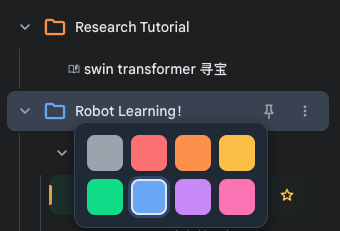
Click the folder icon to customize its color. Choose from 7 default colors or use the color picker to select any custom color.
Account Isolation
Click the "person" icon in the header to instantly filter out chats from other Google accounts. Keep your workspace clean when using multiple accounts.

AI Auto-Organize
Too many chats, too lazy to sort? Let Gemini do the thinking.
One click copies your current conversation structure, paste it into Gemini, and it generates a ready-to-import folder plan — instant organization.
Step 1: Copy Your Conversation Structure
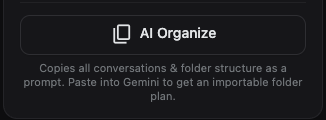
At the bottom of the folder section in the extension popup, click the AI Organize button. It automatically collects all your unfiled conversations and existing folder structure, generates a prompt, and copies it to your clipboard.
Step 2: Let Gemini Sort It Out
Paste the clipboard content into a Gemini conversation. It will analyze your chat titles and output a JSON folder plan.
Step 3: Import the Results
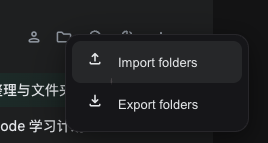
Click Import folders from the folder panel menu, select Or paste JSON directly, paste the JSON that Gemini returned, and click Import.
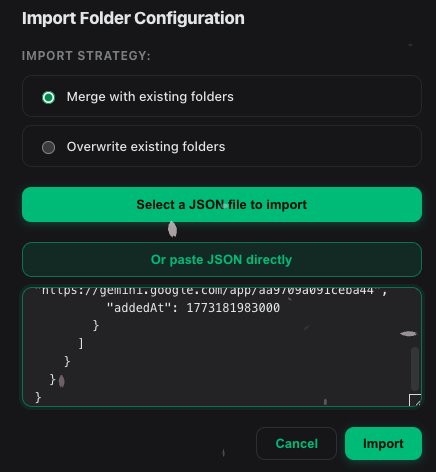
- Incremental Merge: Uses the "Merge" strategy by default — only adds new folders and assignments, never destroys your existing organization.
- Multilingual: The prompt automatically uses your configured language, and folder names are generated in that language too.
Folder as Project
Want new chats to start with a lightweight project preset? Turn any folder into one. This idea is inspired by Claude Projects, but Voyager implements it as a lighter model: folder-based first-message instructions plus auto-filing, not a shared context workspace.
- Enable
Folder as Projectin the extension popup. - Right-click a folder and choose
Set InstructionsorEdit Instructions. - Open a new Gemini chat, use the folder picker beside the composer, and select that folder.
- Send your first message.
What happens next:
- The conversation is automatically filed into that folder after the first send.
- If the folder has instructions, Voyager prepends them only for that first send.
- If the folder has no instructions, it still works as a quick filing shortcut.
- Chats in the same folder do not share memory or read each other automatically.
- Draft auto-save keeps only the text you typed; hidden instructions are not restored into the composer.
AI Studio Exclusive
- Sidebar Adjustment: Drag to resize the sidebar width.
- Library Integration: Drag directly from your Library into folders.