
Tab Title Sync
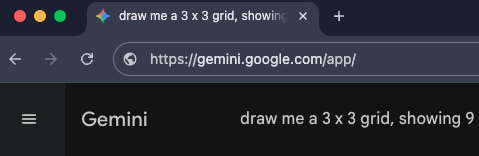
Automatically syncs the browser tab title with the current Gemini™ chat title.
Features
- Real-time Sync: When the chat title changes (e.g., AI generates a new title or you manually rename it), the browser tab title updates instantly from "Gemini" to the specific conversation topic.
- Universal Support: Works perfectly with standard chat pages, Gem conversations, and multi-account environments.
- Toggle Control: If you prefer the default behavior, you can easily disable this feature in the "General Options" section of the settings panel.
How to Use
- This feature is enabled by default upon installation.
- Open any Gemini conversation and observe the browser tab title; it will automatically update to match the chat title.
- To disable:
- Click the extension icon to open the settings panel.
- Find "General Options".
- Toggle off "Update Tab Title".
Contributors
No contributors
Changelog
No recent changes