
Quote Reply
Voyager offers a convenient "Quote Reply" feature, making replies to specific content more precise and efficient.
Introduction
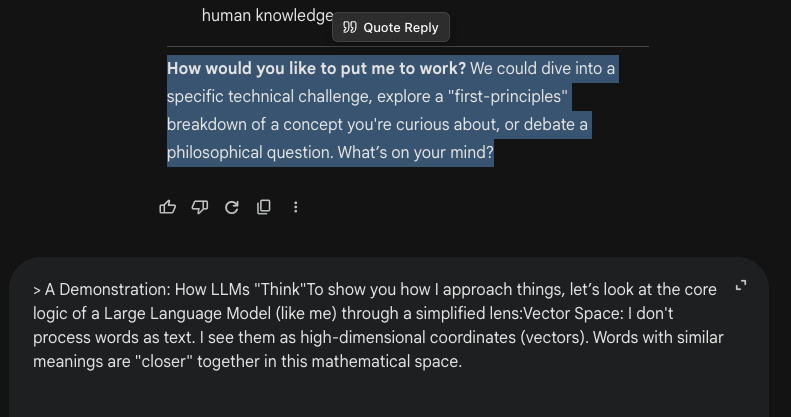
In daily conversations, we often need to follow up on or refute a specific part of the AI's output. The traditional method involves copying that text and manually typing the > symbol in the input box, which is tedious.
Voyager simplifies this process:
- Select to Quote: Use your mouse to select any text in the conversation page (whether it's your question or Gemini's answer).
- Floating Button: A "Quote Reply" button will automatically appear near the selected text.
- One-Click Insert: Click the button, and the selected text will be automatically inserted into your input box in standard Markdown blockquote format (
> content).
Features
- Context Aware: Intelligently identifies conversation content to avoid accidental triggering in unrelated areas (like the input box itself).
- Standard Format: Uses universal Markdown syntax, which Gemini understands perfectly, leading to more precise responses.
- Multi-line Support: If multiple lines of text are selected, Voyager automatically adds quote symbols to each line to keep the format clean.
Tips
- Follow up on details: Select a confusing concept in Gemini's answer, click quote, and then type "Please explain this concept in detail."
- Correct errors: Select incorrect code or facts in the answer, quote them, and point out "This is incorrect, it should be..."
Contributors
No contributors
Changelog
No recent changes