
User Message LaTeX Rendering
INFO
Note: This feature is supported in version 1.3.7 and later.
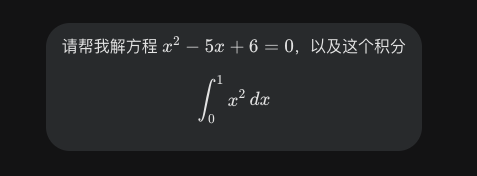
Automatically render LaTeX formulas in user messages as math notation.
Overview
When you use LaTeX syntax in Gemini™ chat (e.g., $E=mc^2$ or $$\int_0^1 x^2 dx$$), Voyager automatically detects and renders them as beautiful math formulas.
Key Features
- Inline math: Wrap with
$...$, e.g.,$x^2 + y^2 = r^2$ - Display math: Wrap with
$$...$$for centered, block-level formulas - Auto-detection: Processes existing and newly sent messages automatically
- KaTeX engine: High-quality math rendering powered by KaTeX
How to Use
- Type a message containing LaTeX syntax in the Gemini chat input
- After sending, formulas are automatically rendered as math notation
- Inline math
$...$renders within the text flow - Display math
$$...$$renders centered on its own line
Syntax Examples
| Input | Description |
|---|---|
$E=mc^2$ | Inline formula |
$$\sum_{i=1}^{n} i = \frac{n(n+1)}{2}$$ | Display formula |
$\alpha, \beta, \gamma$ | Greek letters |
$\sqrt{x^2 + y^2}$ | Square root |
Notes
TIP
- Only applies to user-sent messages. Gemini's replies have their own formula rendering.
- If LaTeX syntax is invalid, the original text will be shown as fallback.
Contributors
No contributors
Changelog
No recent changes