
Conversation Fork (Experimental)
Thinking shouldn't be a one-way street. In complex explorations, we often need to return to a crucial node and try different possibilities.
With the Conversation Fork feature, Voyager allows you to branch out your thoughts and explore parallel universes of your chat.
How it Works
⚠️ Note: This is an experimental feature. You need to enable it first by clicking the extension icon in your browser toolbar to open the settings popup, and turning on the Enable Conversation Fork switch.
Whenever you want to take a different path, simply hover over your prompt and click the Fork button:
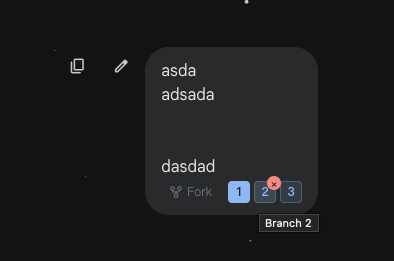
Voyager will instantly capture the entire context from the beginning up to that point and start a brand-new conversation for you.
In this new branch, you can freely modify your question and explore different directions without worrying about destroying your original chat history. Unleash your creativity and curiosity!