
Deep Research Export
Export the final report generated by Deep Research, or save its complete "thinking" process as a Markdown file.
1. Report Export (PDF / Image)
Reports generated by Deep Research can be exported as beautifully formatted PDFs or shareable single images (Markdown and JSON formats are also supported).
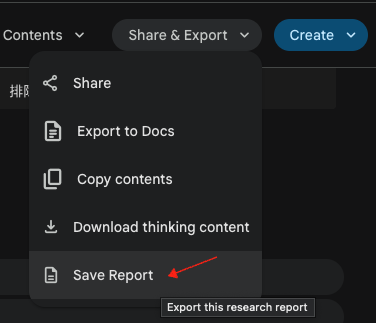
2. Thinking Process Export (Markdown)
In addition to the final report, you can also export the complete "thinking" content from Deep Research conversations.
Features
- One-click export: Download button appears in the conversation menu (⋮)
- Structured format: Preserves thinking phases, thought items, and researched websites in their original order
- Bilingual headers: Markdown files include section headers in both English and your current language
- Automatic naming: Files are timestamped for easy organization (e.g.,
deep-research-thinking-20240128-153045.md)
How to Use
- Open a Deep Research conversation on Gemini™
- Click the Share & Export button in the conversation
- Select "Download thinking content" (下载 Thinking 内容)
- The Markdown file will be automatically downloaded
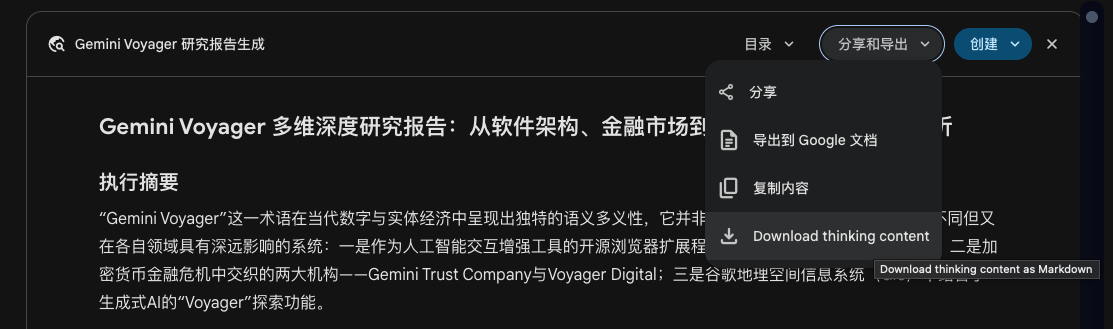
Exported File Format
The exported Markdown file includes:
- Title: The conversation title
- Metadata: Export timestamp and total number of thinking phases
- Thinking Phases: Each phase contains:
- Thought items (with headers and content)
- Researched websites (with links and titles)
Example Structure
markdown
# Deep Research Conversation Title

**导出时间 / Exported At:** 2025-12-28 17:25:35
**总思考阶段 / Total Phases:** 3

---

## 思考阶段 1 / Thinking Phase 1

### Thought Title 1

Thought content...

### Thought Title 2

Thought content...

#### 研究网站 / Researched Websites

- [domain.com](https://example.com) - Page Title
- [another.com](https://another.com) - Another Title

---

## 思考阶段 2 / Thinking Phase 2

...
Privacy
All extraction and formatting happens 100% locally in your browser. No data is sent to external servers.
Contributors
No contributors
Changelog
No recent changes