
Batch Delete
Delete multiple conversations at once, no more deleting one by one.
Features
- Multi-select Mode: Long-press any conversation to enter multi-select mode and check multiple conversations to delete.
- One-click Cleanup: Once selected, click the delete button to remove all selected conversations at once.
- Progress Feedback: Real-time progress is displayed during deletion so you know the current status.
- Safe Confirmation: A confirmation dialog appears before deletion to prevent accidental operations.
How to Use
- In the sidebar conversation list, long-press any conversation item.
- After entering multi-select mode, checkboxes will appear on the left side of each conversation.
- Check the conversations you want to delete (up to 50 at a time).
- Click the Delete button that appears.
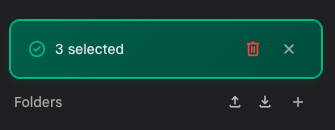
- Click "Confirm" in the red confirmation area that appears above the folder list to start the deletion.
Note
The confirmation panel overlays the folder area to avoid blocking the conversation list. Batch delete operations cannot be undone, so please proceed with caution.
Contributors
No contributors
Changelog
No recent changes